Productivity calculator
- Output per labor hour
- 7.50
- Computed on this page from the inputs below
- Labor minutes each unit took
- 8.0
- Computed on this page from the inputs below
- Units per person in the period
- 1,200.0
- Computed on this page from the inputs below
- Labor cost per unit
- $4.27
- Computed on this page from the inputs below
The numbers on this page come from the inputs you enter and the method stated: 3,600 seconds to an hour, 52 weeks to a year, twelve months to a year, and nothing else. No industry shrinkage figure, no occupancy benchmark and no assumption about your attrition; every one of those is yours to enter.
Email me this result
We will send you these figures and a link back to them. One email, nothing else unless you tick the box.
The figures above start from a worked example (7.50). Change any input and the answer updates as you type.
Download the Productivity calculator worked example (CSV)
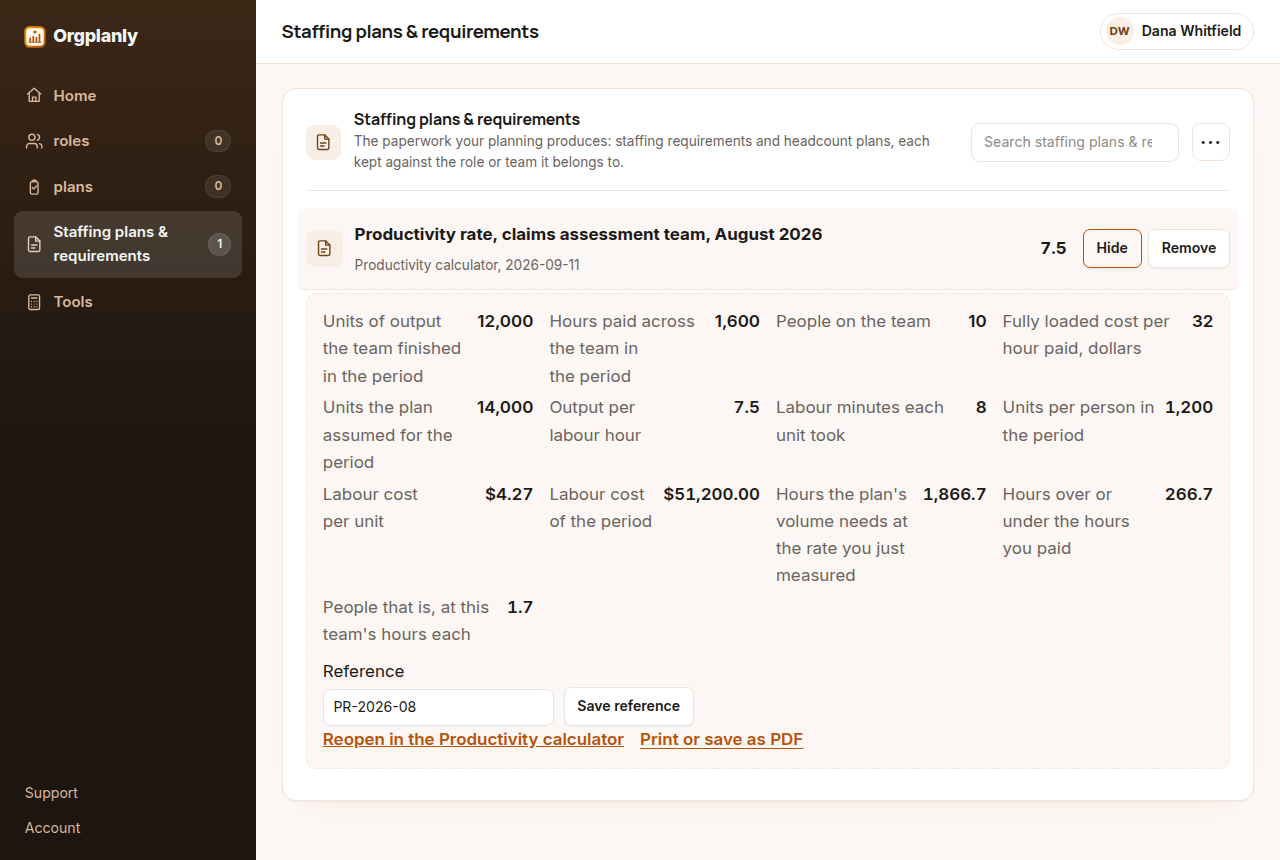
The productivity calculator works the rate in the order a planner needs it: the units the team finished divided by the hours you paid for gives output per labor hour, and inverting it gives the labor minutes each unit actually took. It then does the part a bare rate cannot, which is converting the volume your plan assumed into the hours that volume needs at the rate you just measured, the hours that is over or under what you already pay for, and the number of people that gap represents at this team's own hours each. Enter your own figures and it computes on the page, with no account.
The rate, and its inverse
Units finished divided by hours paid is output per labor hour, and it is the only figure here that is pure arithmetic rather than a planning choice. Hours paid divided by units is the same fact read the other way, shown here in minutes because that is the unit a team recognizes, and it is the more useful one for planning because it multiplies straight into a volume. Both are shown because teams argue about the first and plan with the second.
Cost per unit, so the rate has a currency
Multiplying the paid hours by your fully loaded hourly cost gives the labor cost of the period, and dividing that by the units gives labor cost per unit. This is the number that travels: a rate in units per hour means something only to the people who run the work, while a cost per unit can be put beside a price, a budget line or last year's figure without translation.
The plan's volume, priced in hours and in people
The assumed volume multiplied by the hours each unit took is the hours the plan needs at today's rate. Subtracting the hours you already pay for leaves a gap that is either overtime, a hire or a rate that has to change, and dividing that gap by the hours one person on this team works turns it into the headcount number the plan is really about. Nothing here assumes a rate you have not measured.
What it deliberately does not do
It applies no industry benchmark, because this site publishes none: every figure on the page comes from the five numbers you enter. It also makes no allowance for a learning curve, a seasonal mix or overtime lowering the rate, all of which are real and none of which can be guessed from five inputs. Measure a second period and compare, rather than asking one period to predict.
Productivity calculator: common questions
Which hours should go in, paid or worked? Paid hours, because the plan commits money to paid time and the gap the calculator returns has to be fundable. A rate per hour actually on the work is a separate and useful figure, and the difference between the two is shrinkage.
What if the team produces more than one kind of unit? Run it once per unit, or pick the unit that dominates the hours. Adding unlike units together produces a rate that moves when the mix changes and stays still when the work gets slower, which is the worst of both.
Where do the numbers come from? Entirely from your five inputs. No benchmark, no industry average and no assumed shrinkage appears anywhere in the arithmetic, which is why the worked example is the only example on the page.
Can a negative gap be trusted? It means the plan's volume needs fewer hours than you pay for at the measured rate, which is real but is usually a sign the period you measured was busier than the plan assumes rather than that the team is over-resourced.
Orgplanly Pro
Keeping what you make
The worksheet answered today's question. Pro keeps the answer: the plan you just worked saved against the team it belongs to, re-opened at the next review instead of rebuilt, branded and exported for the budget meeting.
- Keep this scenario, so next quarter starts from it instead of a blank sheet
- Put two scenarios side by side: the plan at your attrition and the plan at last year's
- The plan goes out clean, without the Orgplanly watermark
- Send the plan for review from the record, not a spreadsheet
- Not part of Orgplanly today; your billing stays where it is
- Not part of Orgplanly today; your ledger stays where it is
$90per month, whole team
Start Orgplanly Pro Free for 14 days. No card needed. PricingThe first 14 days are free and no card is asked for. Add a card during the trial and the first charge is on the day it ends; do not, and your workspace becomes read-only with nothing deleted. Orgplanly Pro renews monthly at $6.50 per user per month until you cancel; the price and renewal terms are shown before checkout.